Things to Understand
Before creating a bilingual website, there are things you need to understand. First and foremost, a bilingual website doesn’t mean just offering the content of the page in another language. Yes, that’s an important aspects. But there are lots of parts to your website. Having the content in one language but the rest of the page in another doesn’t make it a bilingual website.
A true bilingual website needs to have all parts of the page translated. That means that the header, footer, forms, image captions and navigation menu all need to also be translated. Any widgets need to be translated. If you have images with text on them or infographics, those all have to be translated.
About Translations
It’s easy to add a plugin like Translate WordPress to your site, and instantly switch your site to any language. However, this is not an approach I ever recommend. Google Translate does a pretty good job of translating languages… estimates I’ve seen rate the translations as about 80% correct. Meaning that 20% of the content is wrong on the page.
Using an automated tool like this also doesn’t account for language dialects. I can easily go to Google Translate and put a word in English and get the word back in Spanish, but did you know there are different dialects of Spanish? Did you know different countries in South America have different varieties of Spanish. This is the same for many, many countries. And if you are targeting a direct population of one of these dialects, you’ll want to make sure that you having the right translation in the right dialect.
The best option when it comes to translating your website is to have the content, menus, and parts of your website translated by a professional translator. Yes, this is definitely going to be more expensive than adding a free plugin, but the result is going to be much better and your user’s experience is going to be much better.
How to get a bilingual website

The best way I know to create a bilingual website is by using a bilingual plugin like WPML, the WordPress Multilingual Plugin.
WPML is a complete translation plugin, that allows you to easily translate pages, posts, custom post types, taxonomies, menus, and more. It’s also compatible with many of our favorite and recommended plugins, such as Beaver Builder, WooCommerce, Yoast, and Gravity Forms.
This is not a free plugin. Depending on your needs, it will cost you between $29 and $79 per year. It’s worth the cost in my opinion. If you’re looking for a free plugin for creating a bilingual website, there is one called TranslatePress in the WordPress repository. I’ve never used it, but it has 60,000 active installs and looks to be actively supported. It might be worth a try.
How it works
I’ve seen many website owners attempt to create a bilingual website by duplicating each page of their website and pasting in the alternate language content. And if you have a super small website, this can work. If you have a bigger website, this can turn into a monstrous undertaking.
Start by installing and activating your plugin. There is a wizard that will walk you through most of the steps, such as picking our your languages (you can have more than two!), entering your license codes, and choosing where to display your language switchers.
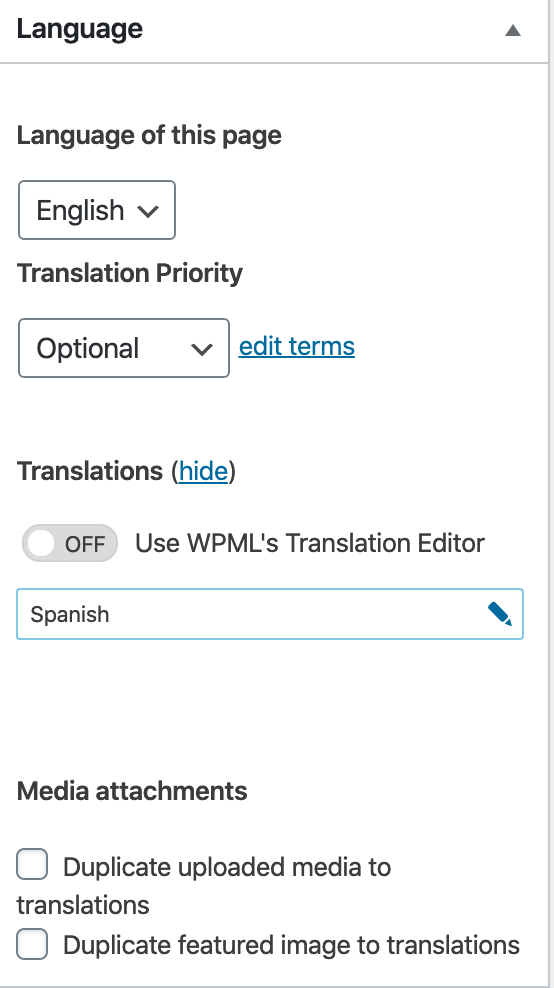
WPML will add translation controls to your pages, posts, and custom post types. You can open any page and choose a language and enter a translation. You can easily go back and forth between them.
Of course, translating the content of your page also means translating your image captions and alt text on your images. If your images have text on them, you’ll want to upload translated images.
If your site has custom fields, you’ll need to provide translations for your custom fields as well.
You can and should also change your permalinks.